Generative Noise Store

CueLinker

Disguise Designer plugin

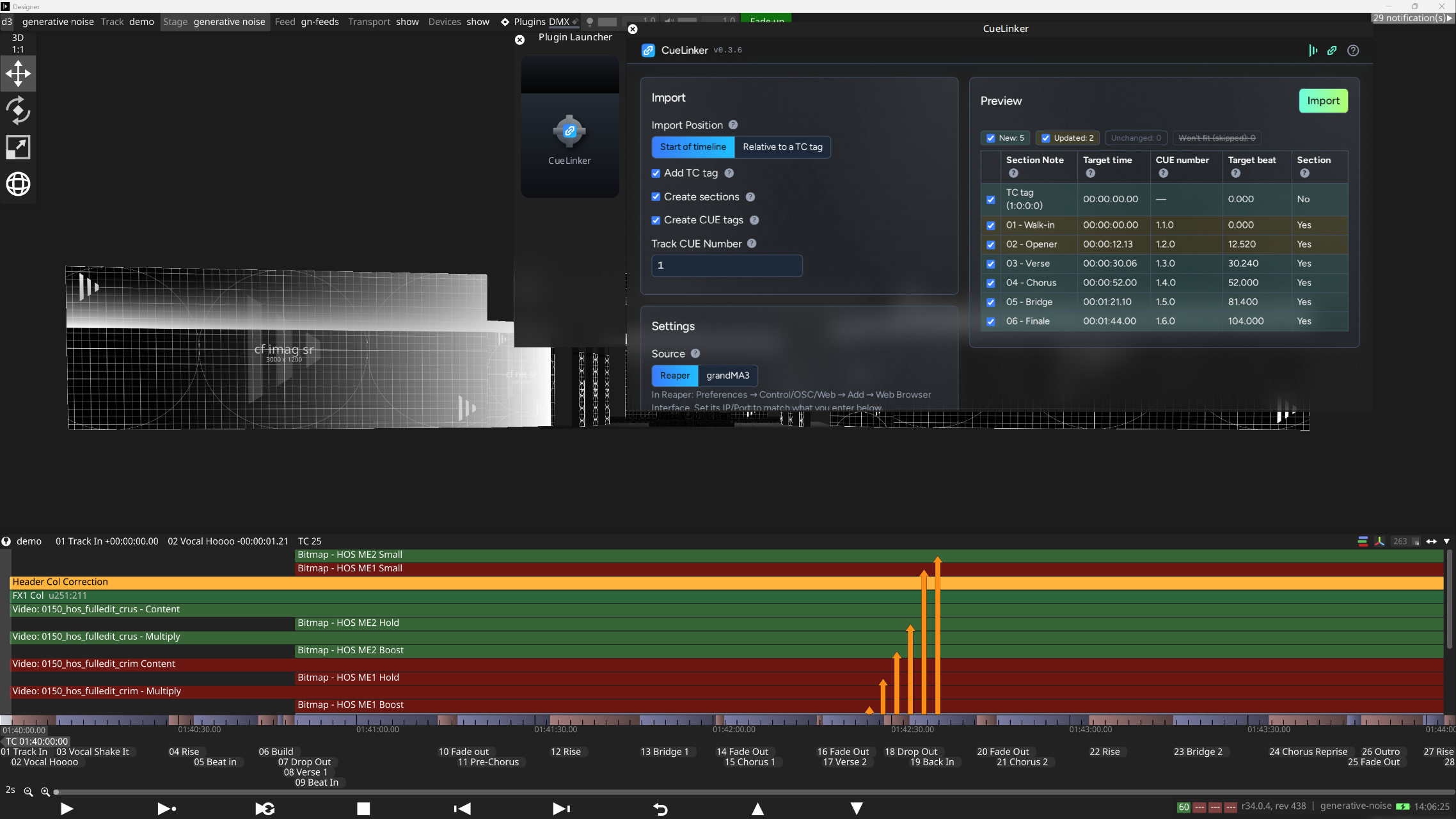
Imports the cues and markers from Reaper and grandMA3 and turns them into content on the Disguise timeline: section breaks, notes and CUE tags, with a timecode tag to anchor them.
Buy£25+Minimum £25 - name a fair price · v0.3.6
CueLinker for Disguise DesignerCueLinker: connection lost statusCueLinker: cues imported to timelineCueLinker: getting started helpCueLinker: grandma3 sequence pickerCueLinker: grandma3 timecode pickerCueLinker: grandma3 timecode previewCueLinker: import relative to tc tagCueLinker: in disguise designerCueLinker: new updated and unchanged cuesCueLinker: reaper connection statusCueLinker: tc tag pickerCueLinker: timeline expansion warning

Getting started

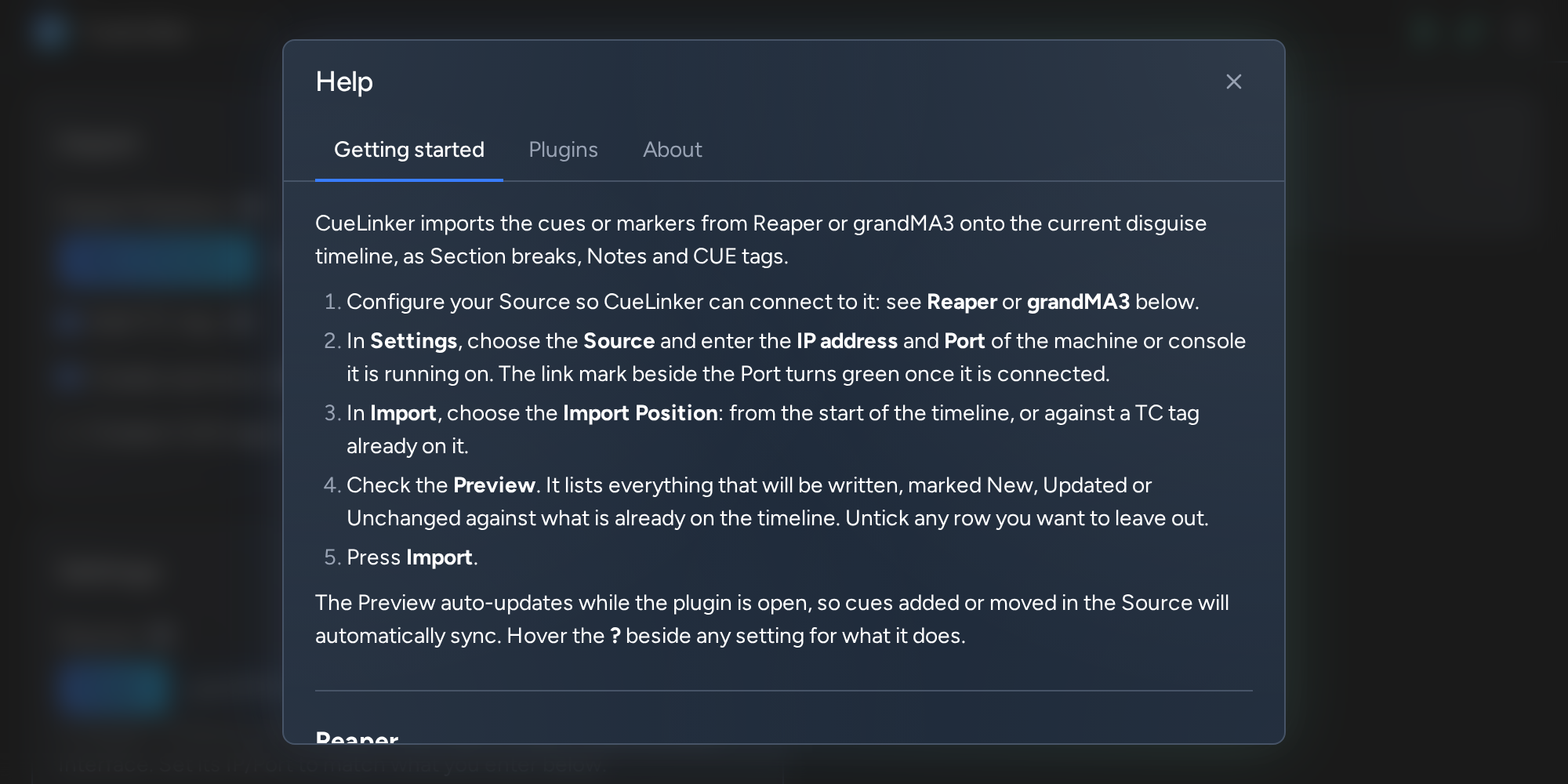
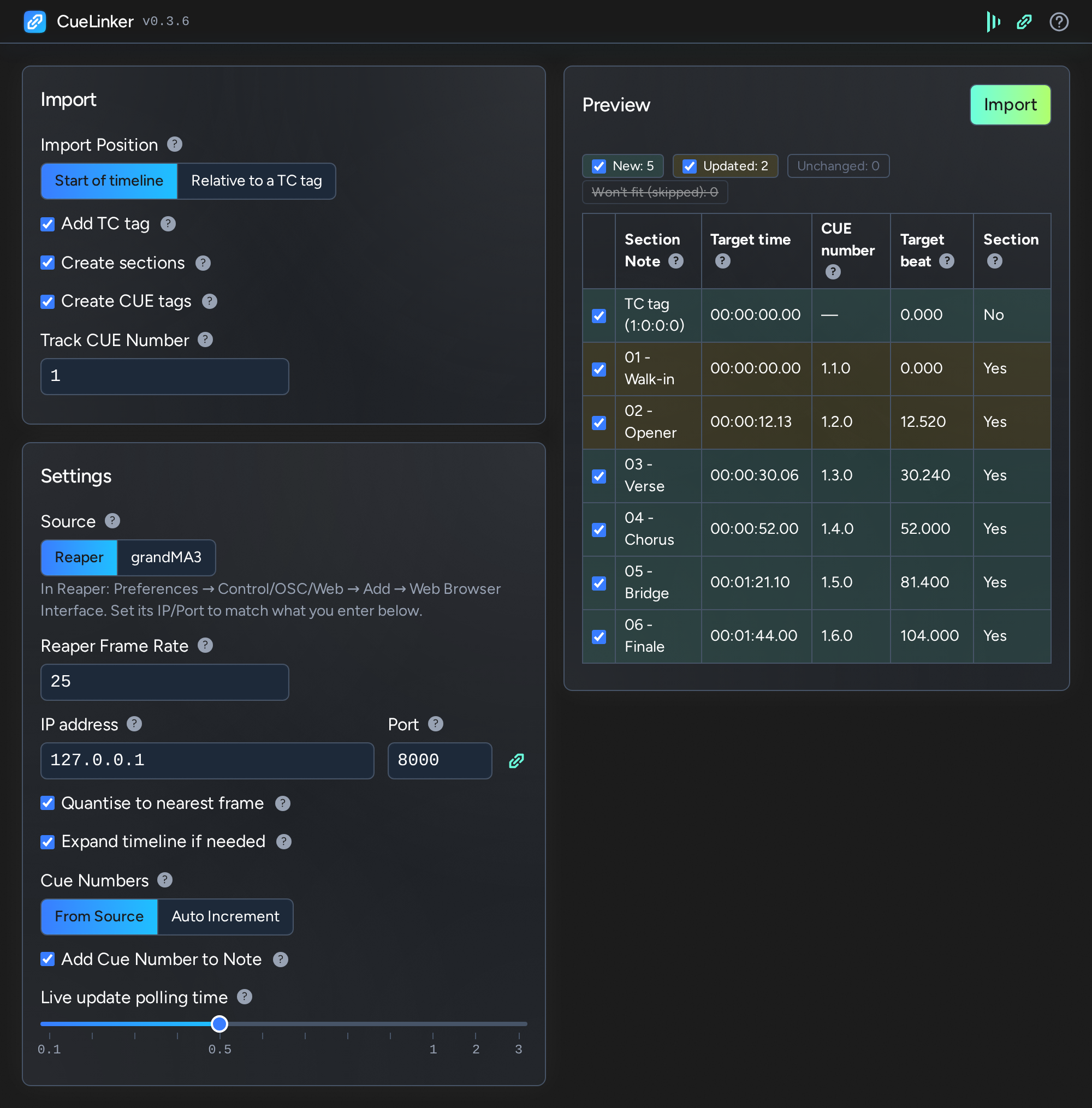
CueLinker imports the cues or markers from Reaper or grandMA3 onto the current disguise timeline, as Section breaks, Notes and CUE tags.

  1. Configure your Source so CueLinker can connect to it: see Reaper or grandMA3 below.
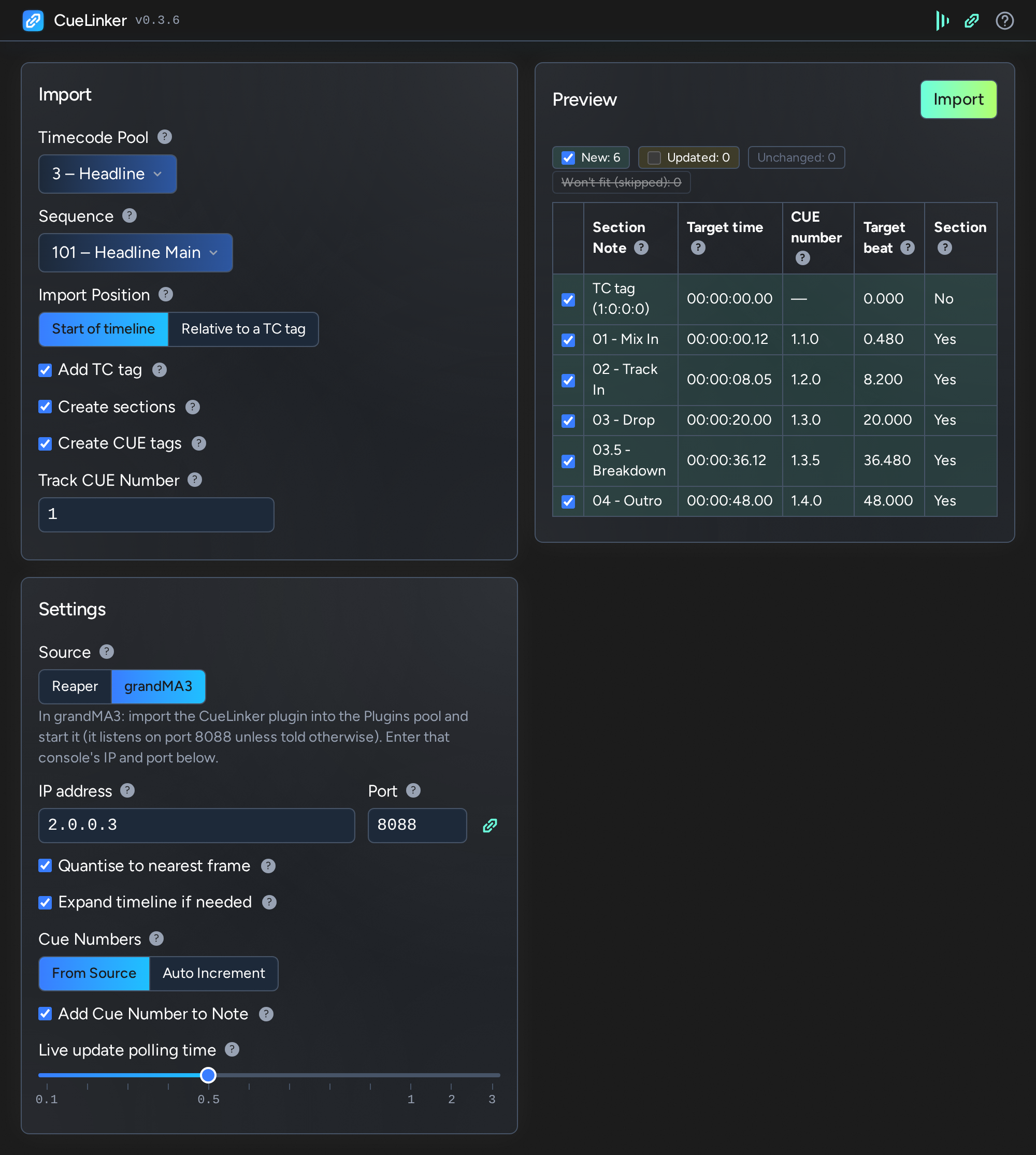
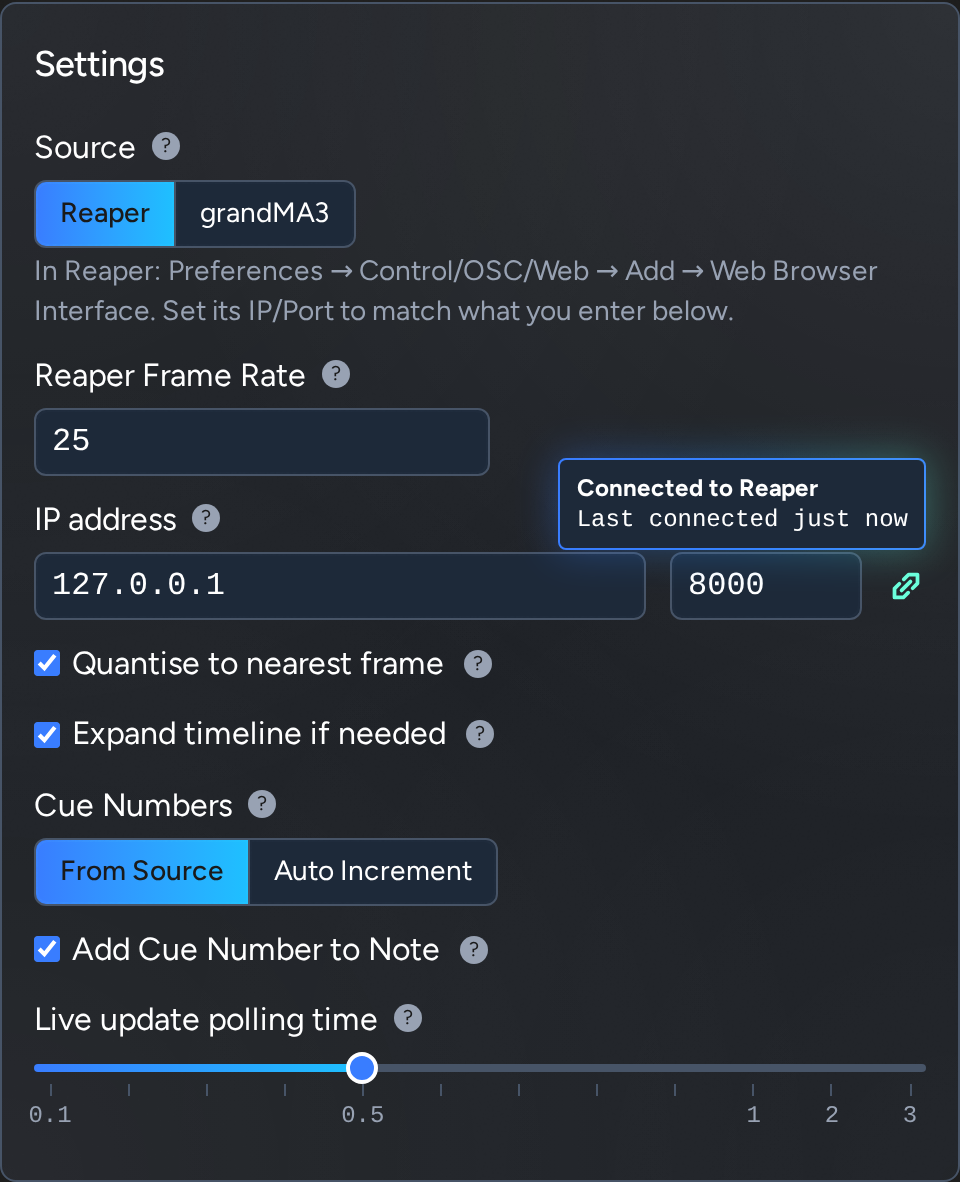
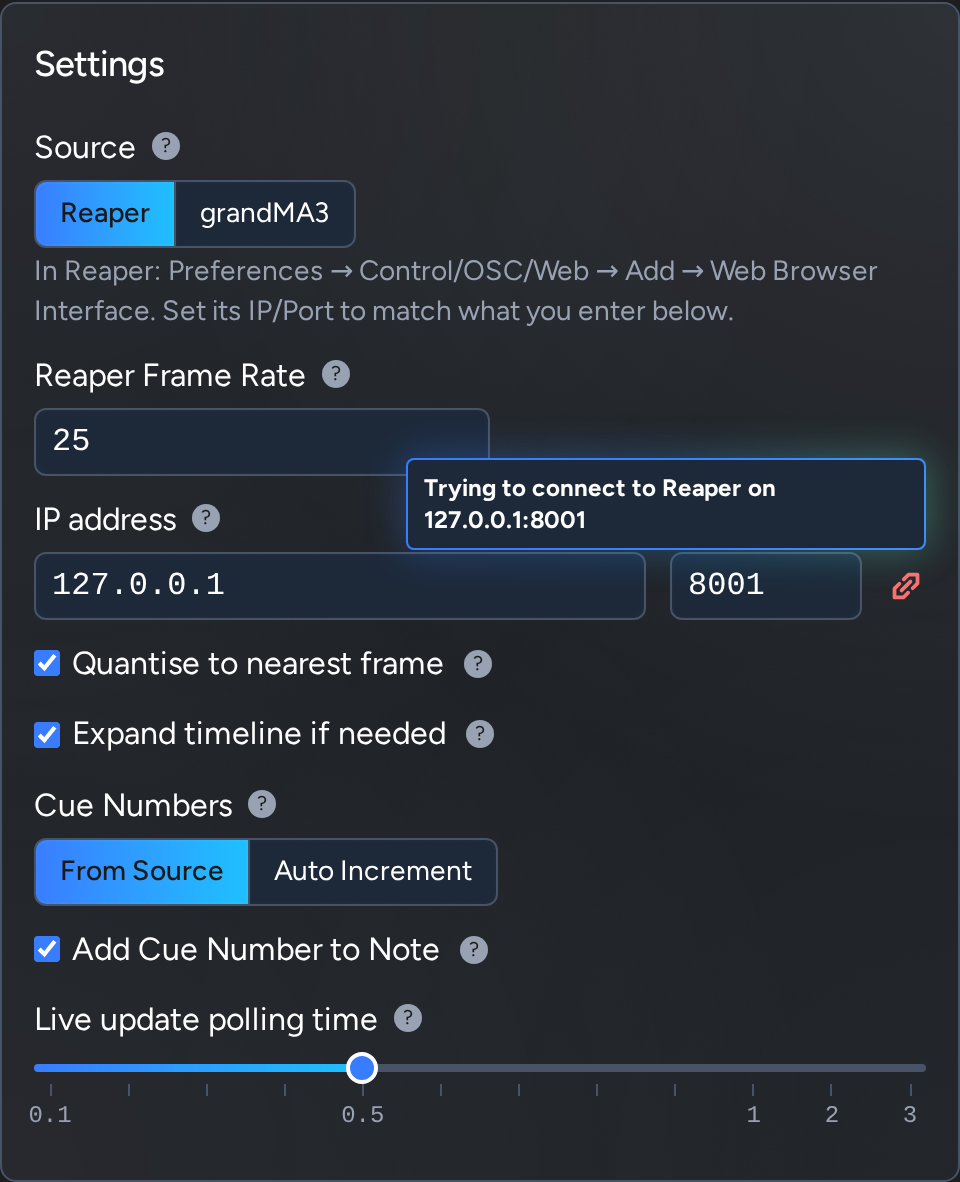
  2. In Settings, choose the Source and enter the IP address and Port of the machine or console it is running on. The link mark beside the Port turns green once it is connected.
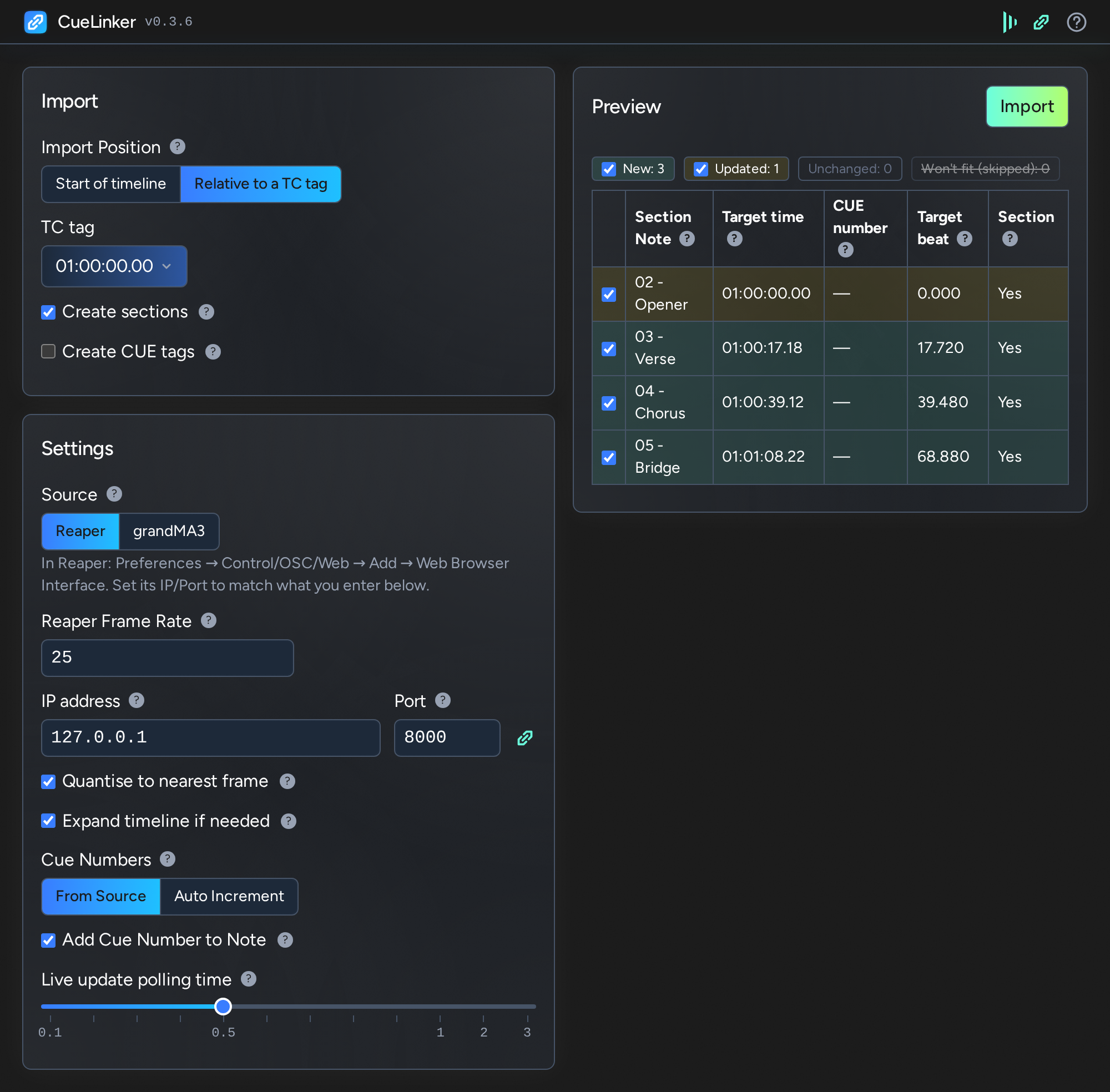
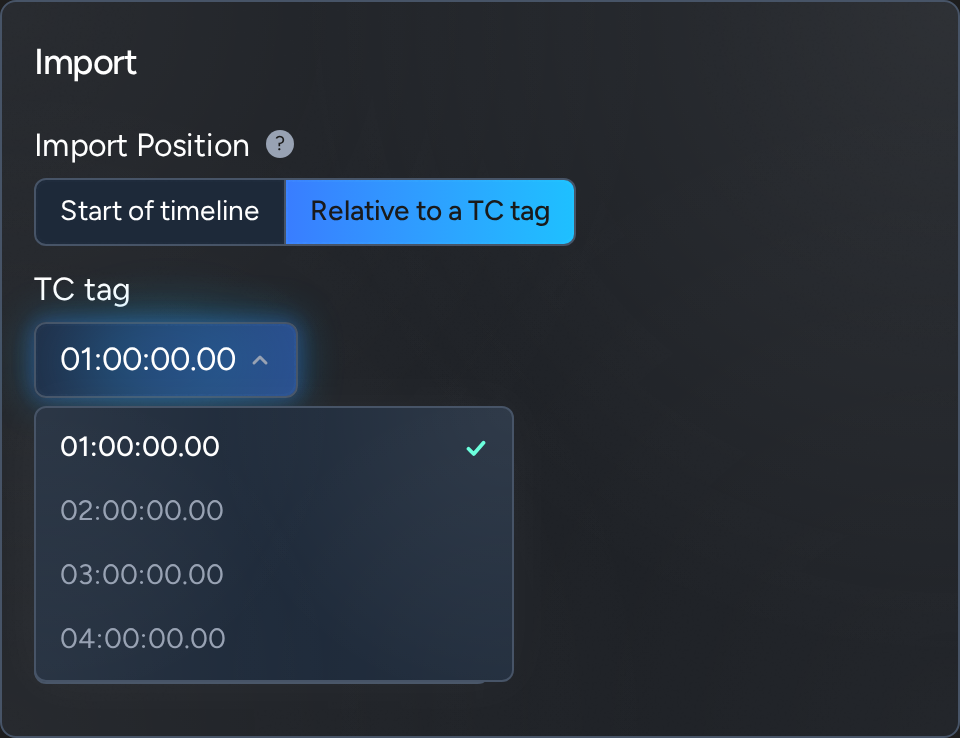
  3. In Import, choose the Import Position: from the start of the timeline, or against a TC tag already on it.
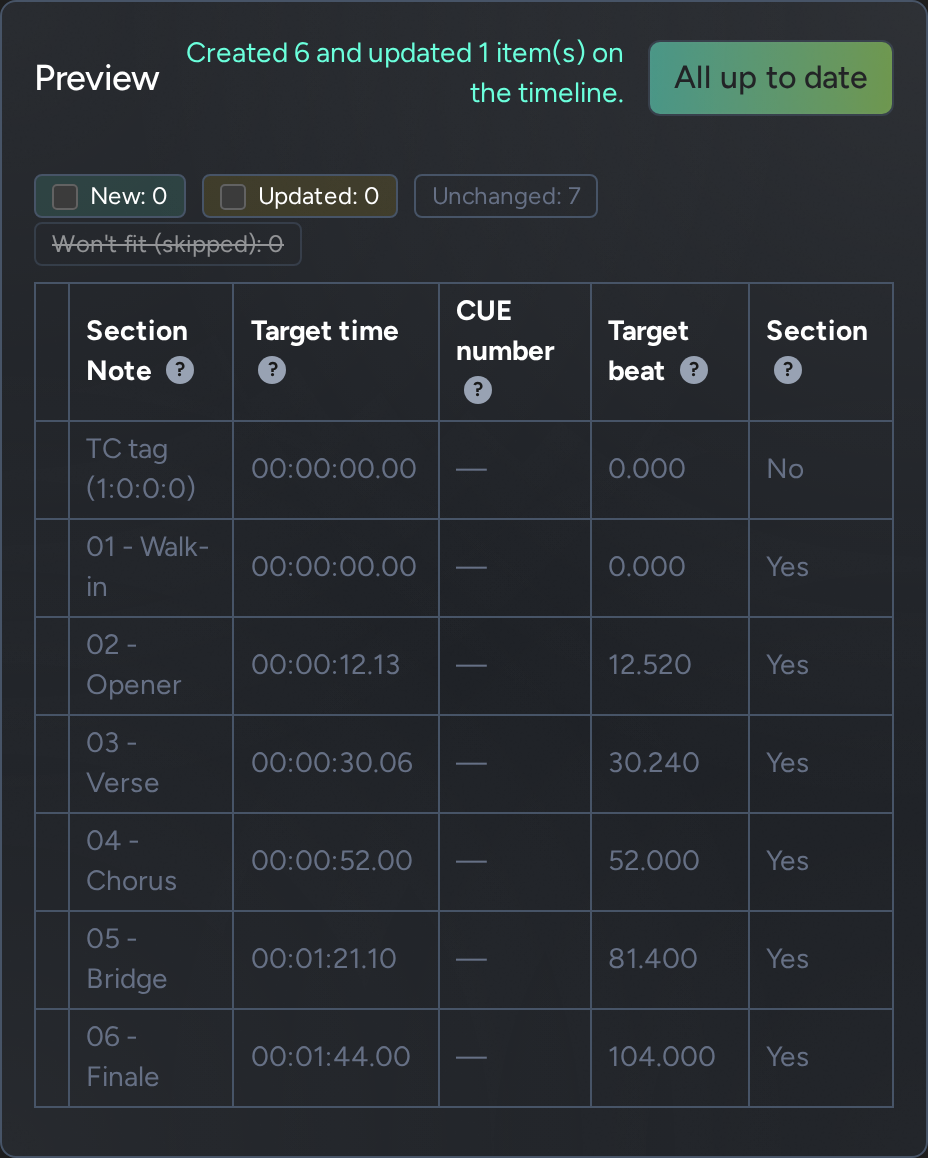
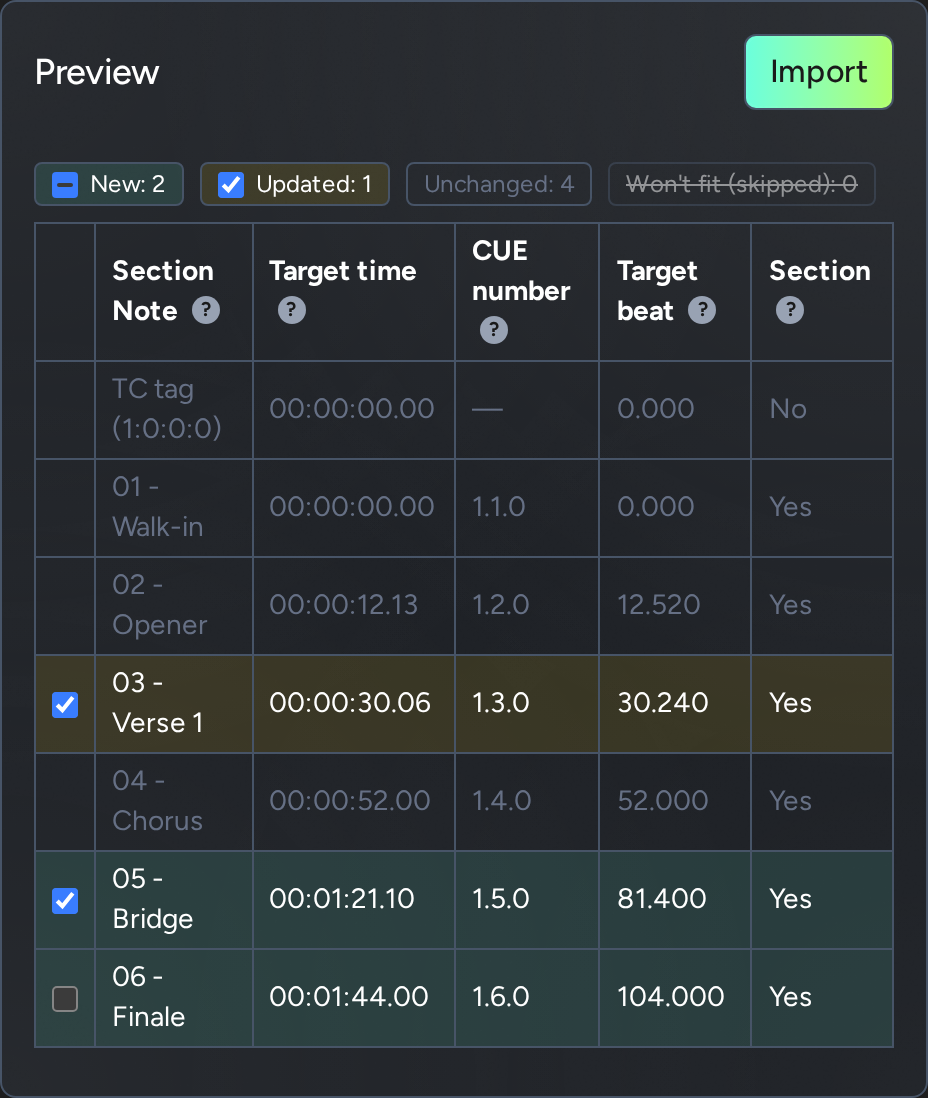
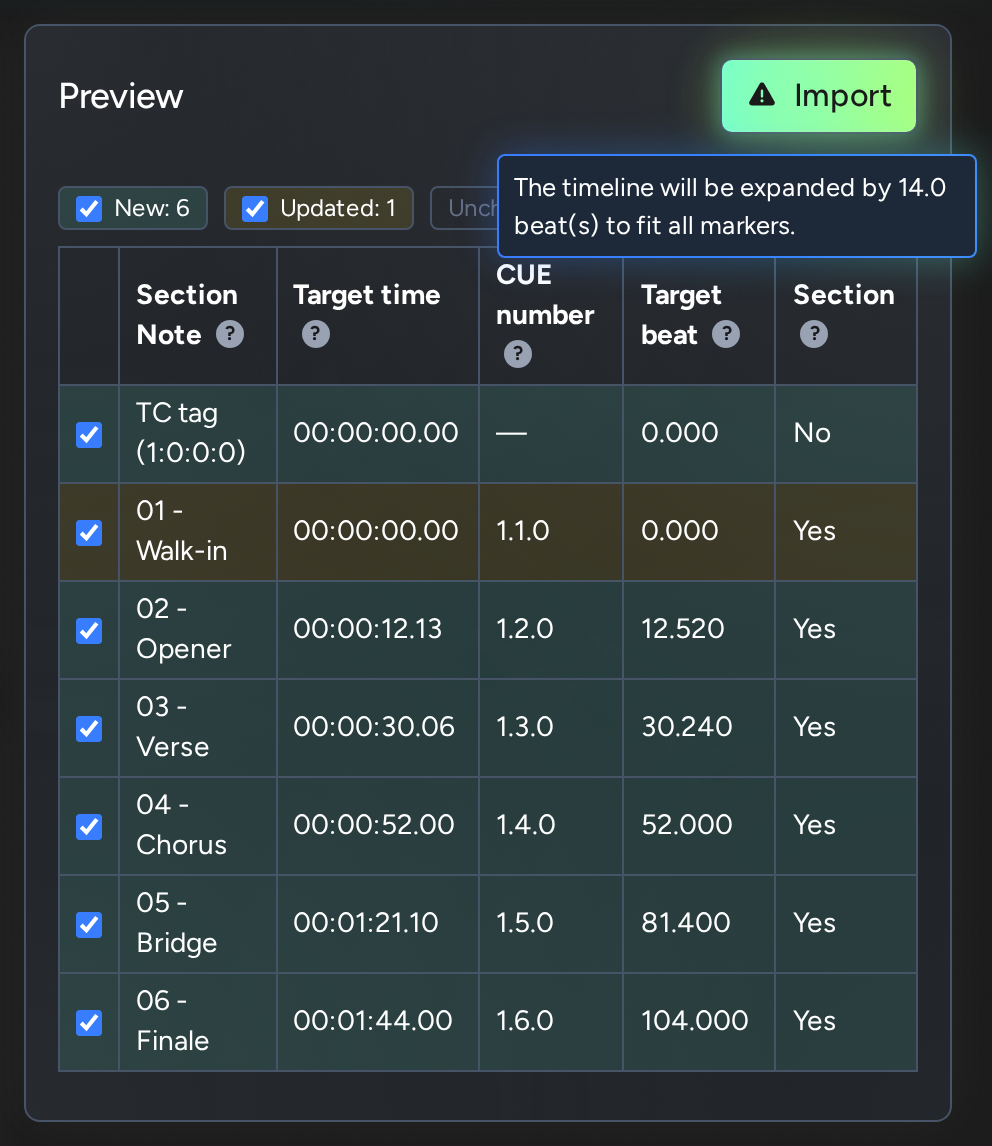
  4. Check the Preview. It lists everything that will be written, marked New, Updated or Unchanged against what is already on the timeline. Untick any row you want to leave out.
  5. Press Import.

The Preview auto-updates while the plugin is open, so cues added or moved in the Source will automatically sync. Hover the ? beside any setting for what it does.

Reaper

Tested with Reaper 7.82

Nothing has to be installed in Reaper. CueLinker reads the project's markers through Reaper's built-in Web Browser Interface.

  1. In Reaper, open Preferences, then Control/OSC/Web, choose Add and pick Web Browser Interface.
  2. Note the port it is set to (8080 unless you change it).
  3. In CueLinker's Settings, choose Reaper and enter the IP address of the machine running Reaper (127.0.0.1 if it is this machine) and that port.
  4. Check the Reaper Frame Rate. Reaper does not report its project frame rate, so it is filled in from the disguise timeline's frame rate. Change it if your Reaper project uses a different one.

Each marker becomes a cue: the marker's name is the Note, and with Cue Numbers set to From Source its marker number is the CUE number.

grandMA3

Tested with grandMA3 2.5.1.0

grandMA3 needs the small read-only CueLinker companion plugin running on the console. The only change it makes to the MA3 showfile is adding the logo to the pool item.

  1. Copy CueLinker.lua and CueLinker.xml from the grandma3 folder that comes with CueLinker into grandMA3's plugin library folder:
    • on a console's USB stick: grandMA3/gma3_library/datapools/plugins
    • onPC on Windows: C:\ProgramData\MALightingTechnology\gma3_library\datapools\plugins
    • onPC on macOS: ~/MALightingTechnology/gma3_library/datapools/plugins
  2. In grandMA3, edit an empty Plugins pool item, choose Import and pick CueLinker.
  3. Tap the pool item to start it. The Command Line History shows CueLinker: listening on port 8088. Tap it again to stop. For a different port: Plugin CueLinker "8090".
  4. In CueLinker's Settings, choose grandMA3 and enter that console's IP address and the port.
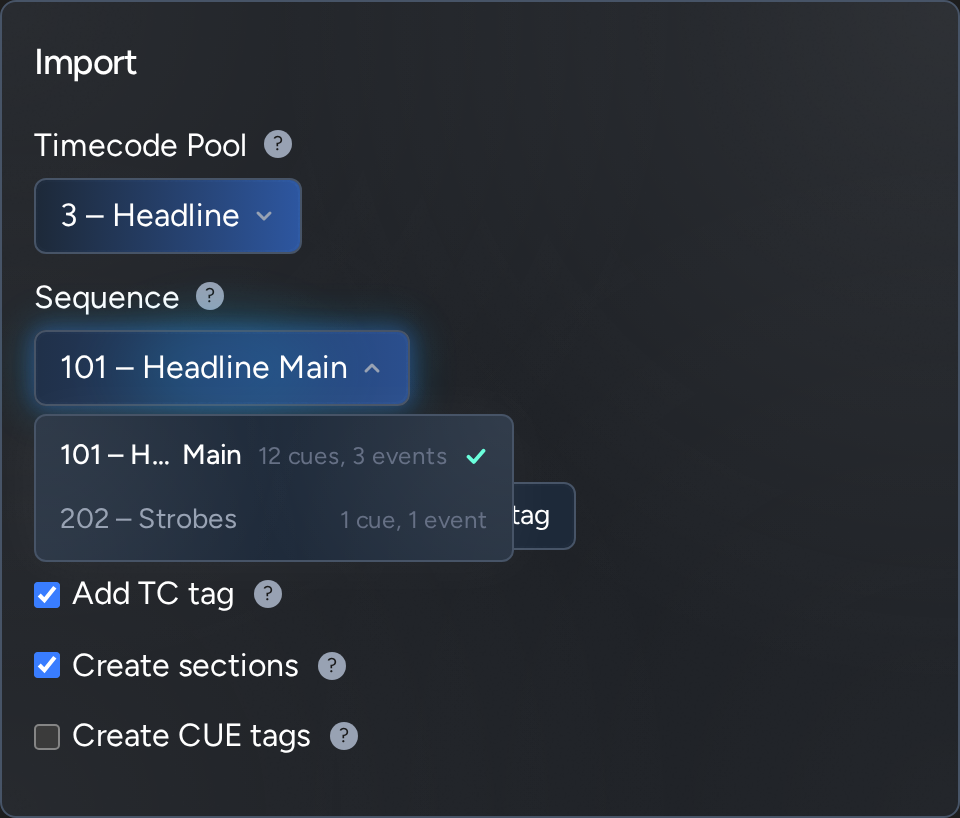
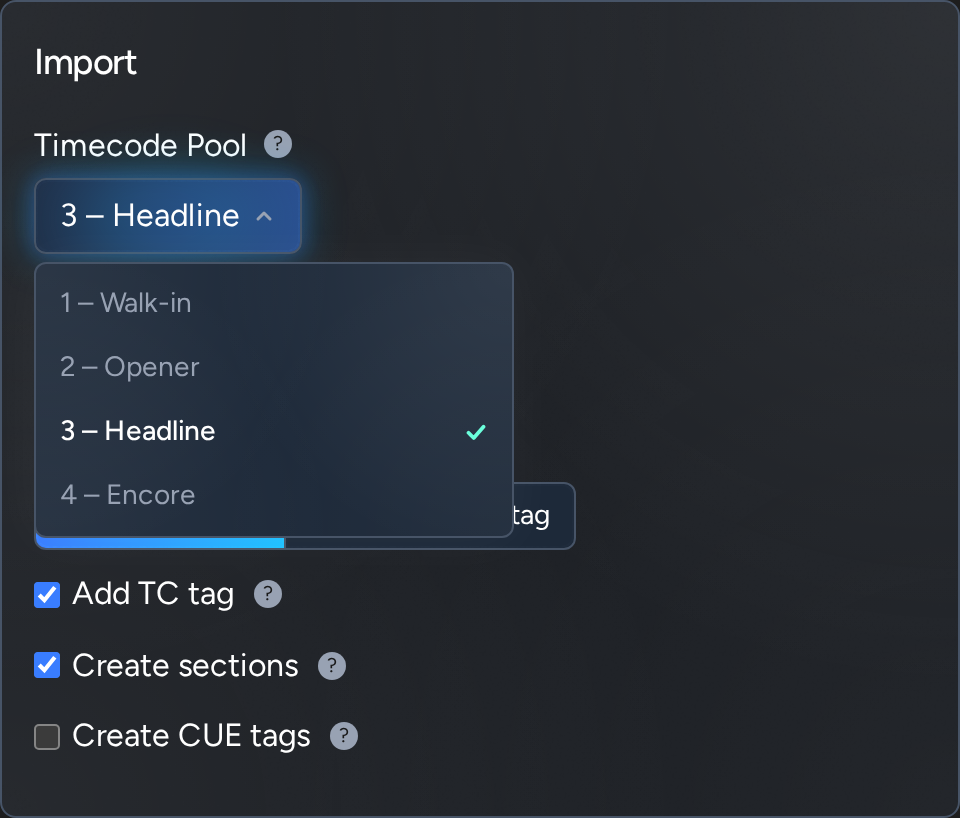
  5. In Import, choose the Timecode Pool and the Sequence to import the event timings from. The Timecode Pool defaults to the one selected in grandMA3.

The plugin has to be started again after loading a show or restarting grandMA3.

Each timecode event on the chosen Sequence's track becomes a cue, named after the grandMA3 cue it fires. With Cue Numbers set to From Source it takes that cue's number.

Release notes

0.3.6

Improved

  • New screenshots for the website
Earlier versions

0.3.5

Improved

  • More e2e and unit testing

0.3.4

Fixed

  • The plugin no longer lags while the source can't be reached

0.3.3

Improved

  • Diagnostics: save a log file for support, or reset all settings, under Help > About.

0.3.2

Improved

  • The Timecode Pool, Sequence and TC tag dropdowns are now drawn inside the plugin, in place of Designer's own. A long name is cut in its middle, so its start and its end can both be read, and each Sequence's cues and events are shown beside its name.
  • In a narrow window the preview table now fits: the Target beat column is left out when there isn't room for it, as Target time says the same thing.
  • Search in a long list: a Timecode Pool, Sequence or TC tag list of more than ten has a search box. Type part of a name and press Enter to take the top match.
  • Double click a word in a text box to select it, and click a third time to select everything. Designer doesn't pass double clicks on to plugins, so until now this did nothing.
  • Hold Backspace, Delete or an arrow key in a text box and it repeats.

Fixed

  • Choosing from the Timecode Pool or Sequence dropdown no longer throws an occasional ACCESS_VIOLATION in Designer: the new dropdowns are drawn by the plugin.
  • A part-typed IP address, or a port out of range, is no longer tried by the preview. The marker list already left it alone, but the preview still asked Reaper for its project start time at that address, which could make Designer hang.

0.3.1

Installation improvements.

Improved

  • The download now includes an INSTALL.txt with how to install and upgrade CueLinker, and instructions for the MA plugin.

0.3.0

No changes to how CueLinker works, but switches to the Generative Noise template, shared with the other plugins for disguise.

Improved

  • CueLinker's look, status bar, Help and tooltips now come from a shared kit, so future improvements are shared across all plugins.

0.2.0

Help inside the plugin, with a getting started guide for Reaper and grandMA3.

New

  • Help: click the ? in the status bar to read a getting started guide with setup steps for Reaper and grandMA3, a list of Generative Noise's plugins, and an About tab with the support email address and the open-source libraries CueLinker uses.

Improved

  • Tooltips throughout have been reworded to be shorter and clearer.
  • The Add TC tag tooltip now names the Source you have selected.
  • The grandMA3 plugin version warning now says which side is older, and which one to update.

Fixed

  • In a window narrower than 640 pixels, the panes are no longer cut off at the right edge. The preview table's headings wrap when there isn't room for them on one line.
  • The page behind the release notes no longer scrolls while they are open.

Known issues

  • Choosing from the Timecode Pool or Sequence dropdown can occasionally throw an ACCESS_VIOLATION - an issue with how Designer renders the page.

0.1.1

New

  • Release notes inside the plugin: click the version number in the status bar.

Improved

  • Relative to a TC tag with no TC tags on the timeline no longer shows an error. Cues are imported from the start of the timeline instead, the Import pane says so, and "Add TC tag" is offered so you can create one.
  • With several TC tags and none chosen yet, the preview asks you to choose one, without showing an error.
  • Create sections off now removes a Section break already at an imported cue's position, the same way Create CUE tags off removes a CUE tag. The preview shows those rows as Updated, with "Remove" in the Section column. The Section at the very start of the track is never removed.

0.1.0

A status bar along the top of the plugin, so you can see at a glance whether CueLinker is linked to Designer and to Reaper/MA3.

New

  • Status bar with the CueLinker version and two connection indicators: one for Designer, one for the Source (Reaper or grandMA3). Hover an indicator to see when it last connected, or when settings were last saved.
  • grandMA3 plugin version check: the Source indicator turns amber if the CueLinker plugin running in grandMA3 is a different version from this one. Its tooltip also names the show file.
  • Tooltips on the preview table headings, explaining what each column means.
  • Support QR code on the error panels: scan it to start an email to support with the details already filled in.

Improved

  • The Source indicator beside the Port field replaces the Test Connection button, and updates automatically.
  • When Reaper/MA can't be reached, the preview shows "Trying to connect" and keeps retrying, with better instructions.

Fixed

  • A part-typed IP address (such as 192.168.0) is no longer looked up as a hostname, which could make Designer hang and the UI to freeze.
  • Tooltips near the top of the window no longer open behind the status bar, or behind other icons.

Installation

  1. Unzip the download.
  2. Move the GN_CueLinker folder into a Plugins folder: your project's, to use it in that project, or d3 Projects/common/Plugins, to use it in every project on that machine.
  3. In Designer, click Plugins in the title bar and open CueLinker.
The full installation guide

Licence

Every plugin has a generous licence that doesn't limit its use in production. There are no licence keys or online activations, and the files are an instant download.

We hope you work in good faith: if you use a plugin commercially, pay to support its development, and don't pass it on.

Read the licence

More plugins

All plugins